Module Tree Window
The Module Tree occupies the window to the left edge of the Source Debugger.
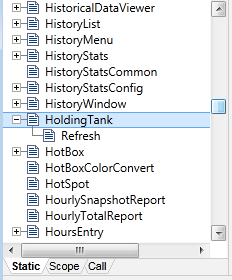
As the implies, the module tree shows a list of all modules in the selected application, organized in a hierarchical structure. The modules shown in the trees are not dynamically updated in real-time. To do so would impose a significant execution overhead that would likely impair or affect the normal running of the system. The trees are automatically refreshed when a breakpoint is "hit", or when the "Refresh Trees" tool bar button is clicked.
A plus symbol indicates that a module has submodules.
Use the three tabs at the bottom of this window to change the type of modules that are displayed in the module tree as follows:
Static
Displays static modules. This represents the hierarchy of modules present in the source code of your script application when it was compiled. The static tree shows you exactly what is in the engine, statically loaded without any parent.
Scope:
Displays the "parent/child" relationships of each running module instance. Whereas the static tree displays one entry per compiled module, the scope tree displays one entry per module instance that is running, therefore, there may be none, or many entries for the same module code. A module instance in the scope tree will resolve its variable references in its parent module instances shown in this tree.
Call:
Displays the actual call sequence for each module instance (i.e. which module has called a module instance (see Module Calls)).
Use the Sort Tree button in the Variables group of the toolbar to sort the module tree alphabetically.
When you have added (or deleted) modules from an application while you are debugging, use the Refresh Trees tool in the toolbar to to ensure you are viewing the application’s latest data.
